
A suspicious APK rarely identifies itself as spyware. It may look like a utility, a family-safety app, or a harmless update, while its code and configuration suggest possible Android malware.
Searches for YARA rules often begin with one goal: find stable evidence without overreacting to a single permission or string. YARA can speed up defensive triage, but a match is not proof that an app spies on someone.
The strongest rules come from controlled sample handling, careful static analysis, and repeated testing against both suspicious and known-good Android files.
Key Takeaways
- Treat YARA matches as defensive triage signals, not proof of Android spyware, malicious intent, attribution, or surveillance.
- Analyze authorized samples in an isolated lab, preserve originals and chain-of-custody records, and document hashes, provenance, and scan scope.
- Build file-specific rules for APK archives, extracted DEX files, and native ELF libraries using distinctive, linked artifacts rather than single permissions or generic strings.
- Test rules against suspicious samples and realistic known-good software, record false positives and misses, and require peer review before production use.
- Use static, dynamic, and capa-based findings as complementary evidence while accounting for obfuscation, packing, and dynamic loading.
Begin With Triage, Not a Verdict
YARA is an open-source tool and pattern matching language that helps analysts identify files with related text strings, byte patterns, or file characteristics. YARA rules define a rule name, optional tags, optional metadata, strings, and a required condition section. That section determines when the rule matches. The official YARA rule-writing guide covers the basic structure.
For Android malware detection, rules can scan extracted DEX files, decoded resources, configuration files, and native .so libraries. They can also scan an APK archive, although compressed content may hide strings from a raw archive scan.
In Android security work, YARA is a triage aid, not a verdict.
A useful YARA rule answers a narrow question. It might flag an extracted DEX file that contains a distinctive namespace and two linked configuration markers. It should not claim to identify spyware solely because an app requests sensitive access.
A YARA match is a triage signal. It does not prove surveillance, attribution, malicious intent, or a user’s purpose.
Keep your rule labels honest. Use terms such as review, suspicious, or family_candidate until code review and authorized behavioral evidence support a stronger conclusion.
Build a Legal, Isolated Sample Lab
Only analyze suspected malware samples when your organization owns them, has written permission to inspect them, or received them through an authorized incident-response process. A suspected sample isn’t automatically confirmed malicious, and permission is required before inspection. Don’t retrieve suspicious APKs from social posts, untrusted file hosts, or devices without the owner’s knowledge and consent.
Keep the original file read-only. Work from a copied artifact in an offline virtual machine or segregated analysis workstation. Unknown samples never belong on a personal phone, a work phone, or an emulator signed into a real Google account.
Preserve a clear chain of custody
Record where each file came from, who handled it, when it arrived, and its SHA-256 hash. Preserve related information, including the source URL, file name, package name, installer context, and any reported user symptoms.
Gemini summarization may organize analyst-authored notes. It must not receive APKs, extracted code, or personal data, and it must not replace human review.
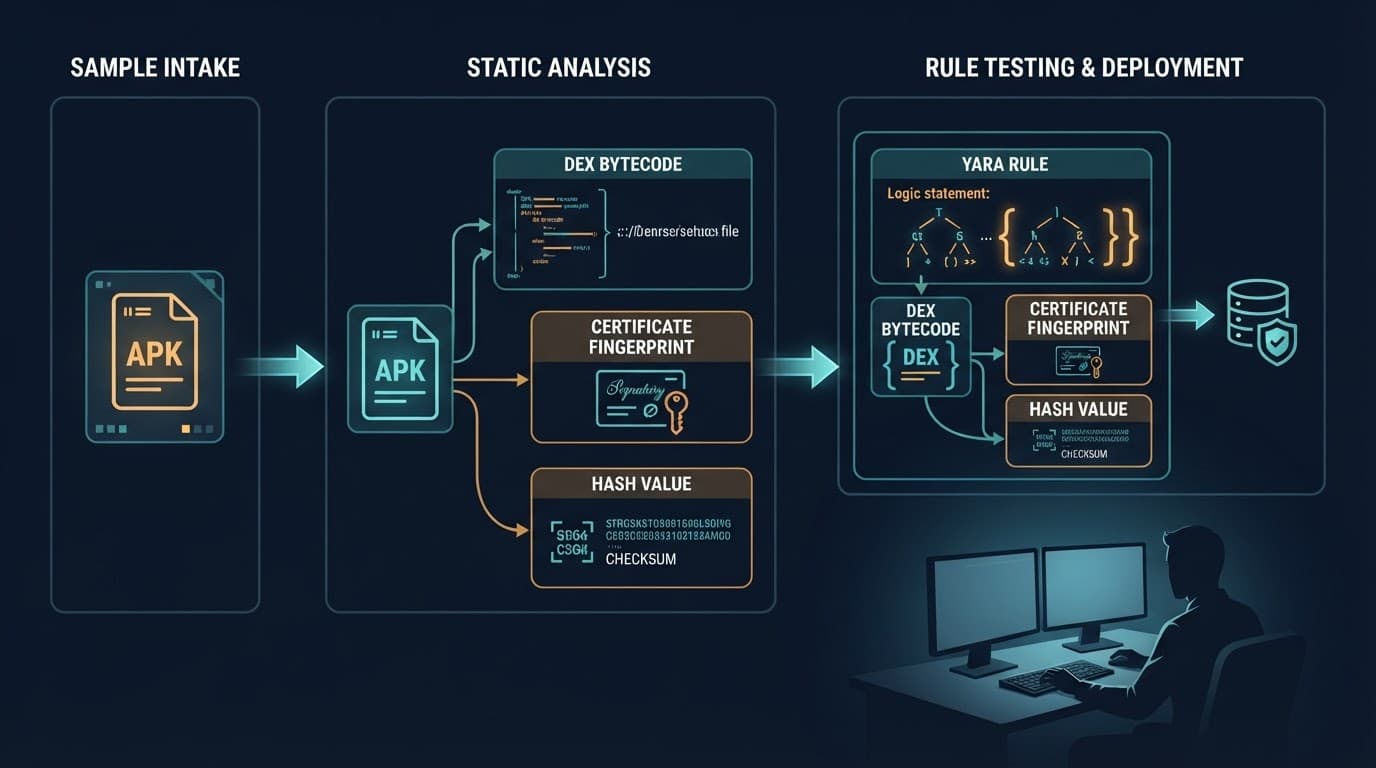
The table below keeps investigation steps separated from risky execution.
| Stage | Defensive action | Evidence to preserve |
|---|---|---|
| Authorization | Confirm ownership, consent, and written scope. | Ticket, consent record, and case number. |
| Intake | Copy the original without opening or installing it. | Original filename, source, and timestamp. |
| Hashing | Calculate a SHA-256 digest for every artifact. | Digest and analyst record. |
| Static review | Inspect the archive, manifest, DEX, and native files offline. | Extracted file inventory and notes. |
| Rule testing | Scan controlled corpora and document every hit. | Rule version, results, and false positives. |
Keep unknown code outside your daily environment
Static analysis should come first because it lets you inspect an APK without launching it. If a case later requires behavioral analysis, use an approved instrumented emulator with no personal accounts, contacts, photos, microphone data, or unrestricted network access.
Treat untrusted sample sources as out of scope for laboratory work. Don’t browse, download, or execute suspicious material from social posts, untrusted file hosts, or unknown websites. Preserve a relevant source address as case context only when needed, without accessing it.
Inventory the APK Before Writing Any Rule
Begin Android malware triage by identifying the artifact accurately. Use static analysis for the initial inventory.
An APK can include AndroidManifest.xml, one or more classes*.dex files, resources, assets, signer details, and native libraries. These libraries are ELF files stored under paths such as lib/arm64-v8a/, so record any JNI relationships connecting them to app code.
Hash files and review signing details
A SHA-256 value proves that two files are identical. It doesn’t establish that either file is safe or harmful. Still, hashes make repeatable analysis possible and prevent teams from mixing samples.
Next, inspect the signer certificate as part of Android security and provenance review. Android’s apksigner documentation explains signature verification and certificate output. Record the certificate’s SHA-256 digest, subject information, signing scheme results, and whether related samples share the same signer.
A repeated certificate can support a family hypothesis when it appears alongside related code artifacts. It’s weak evidence by itself because developers may sign many unrelated apps with one certificate, and debug certificates are common in development builds.
Unpack copies, never the original
Use a copied APK in the lab and list its contents before extraction. Android Studio’s APK Analyzer tools can help inspect package composition, DEX information, resources, and files without treating the package as a normal app.
Keep separate folders for decoded manifest output, extracted DEX files, assets, and native libraries, recording libraries and methods reachable through JNI. This matters because YARA rules designed for extracted DEX files won’t behave the same way against raw APK archives. Set the scan scope to distinguish archives from extracted files.
Read Manifest, DEX, and Native Code as Separate Evidence
Android spyware analysis becomes more reliable when you compare several layers of an app. The manifest describes declared components and permissions, providing context for Android security review. DEX files contain Dalvik or ART bytecode. Native .so files contain ELF binaries compiled for Android architectures.

Treat permissions as context, not a verdict
Android permissions restrict access to protected system functions and data, as described in Android’s permissions overview. Review <uses-permission> declarations alongside exported components, services, receivers, and code paths that call sensitive APIs.
Permissions for notifications, accessibility features, location, media, SMS, or contacts can be legitimate in many apps. A messaging client, emergency app, accessibility tool, or enterprise device-management client may request access that looks alarming in isolation.
Treat unusual combinations as review leads, especially when app behavior, service names, hidden configuration, and code artifacts support the same concern. Do not write a rule that classifies an APK as spyware because it requests one permission.
Inspect DEX and native ELF libraries separately
DEX inspection can reveal package namespaces, method names, string constants, URLs, JSON keys, and configuration labels. Search for relationships between these elements instead of relying on generic terms such as sync, upload, or service. Capability findings from capa rules can corroborate those relationships, but they don’t replace analyst judgment.
Native ARM ELF files deserve separate attention during binary analysis. An Android app may use native code through the Java Native Interface, or JNI. This supports performance-sensitive tasks and shared libraries, but can make code harder to review. Legitimate apps use this pattern too. Trace each JNI method to its callers and observed behavior before treating it as suspicious.
Use file-specific rules for extracted .so files, and build YARA rules around the file type and related artifacts. Match an ELF header plus several related strings, unusual resource names, or stable byte sequences observed across authorized samples. Capability findings from capa rules can corroborate those matches, but they don’t replace the rule or analyst judgment. Avoid broad rules that match every library containing ordinary networking or encryption text.
Choose Indicators That Survive a Version Change
YARA rules for Android malware research are strongest when they focus on uncommon combinations that persist across related malware families. A stable pattern can survive a renamed application, a localized interface, or a minor release update. Obfuscation techniques can still alter visible indicators.
Favor linked, distinctive artifacts
For threat hunting, the following uncommon, linked indicators are often useful when corroborated by code review:
- A family-specific package namespace paired with multiple uncommon configuration keys in the same extracted DEX file.
- A repeated signing certificate combined with matching native-library names and related code artifacts.
- A distinctive custom protocol field or encrypted configuration marker found in several authorized samples.
These clues work because they are connected. capa rules can provide a separate capability signal, but they shouldn’t determine a family hypothesis. A malware author can rename one class or alter a visible label, but changing every related internal artifact often requires more work.
Reject weak evidence early
The following items create false positives when used alone:
- A single Android permission, even if it’s sensitive.
- Generic strings such as
location,record,accessibility, ordevice. - A package name that resembles a known brand or a broad app category.
Threat intelligence can help form a candidate hypothesis, but it can’t substitute for file evidence. Google’s Android 15 behavior guidance notes that malware may target lower API levels to avoid newer protections. Record an app’s targetSdkVersion as a triage detail, but don’t treat it as a verdict.
Marketing claims are weak evidence too. A package described as a “mobile hacking tool” or a phone monitoring tool might be unauthorized, deceptive, or legitimate under a consent-based management policy. A label or button such as Download Pathfinder Rat is a marketing artifact, not a technical detection indicator. Don’t fetch it from an analysis host.
Structure a Defensive Android YARA Rule
Use descriptive rule names and metadata when writing YARA rules, so another analyst can understand the match months later. A clear rule name helps preserve context across investigations. The metadata section should state the rule’s purpose, scope, author, creation date, confidence, and supporting case reference where permitted.
The fictional example below scans an extracted DEX file, not a raw APK. Its indicators are invented for training and do not identify a real spyware family.
rule Training_Synthetic_Dex_Review : android dex training {
meta:
purpose = "defensive triage"
scope = "extracted DEX only"
strings:
$training_ns = "org.training.lantern" ascii
$training_route = "batch_state_v9" ascii
$training_cache = "session_ledger" ascii
condition:
uint32(0) == 0x0A786564 and 2 of ($training_*)
}
The strings section lists the markers that pattern matching compares inside the extracted file. The condition section combines those markers with file-type and count checks.
The header check limits the rule to DEX files. The first four bytes of a DEX file begin with dex followed by a newline, represented here as a little-endian integer.
The 2 of condition requires two related fictional markers. That reduces accidental matches caused by one ordinary-looking string. The rule does not use a permission, app label, or a live command-and-control address.
Separate ELF files need a file-specific rule scope and header check. JNI-aware native variants may also need indicators from native code.
For native capability review, capa rules can highlight behaviors that support a finding. Those capa rules are supporting evidence, not a substitute for YARA conditions.
Production rules may also include a filesize limit, string modifiers, or a hex pattern. Keep every added condition tied to observed and documented evidence. Keep YARA rules focused, because unnecessary complexity makes them harder to trust and maintain.
Test Rules Against a Balanced Corpus
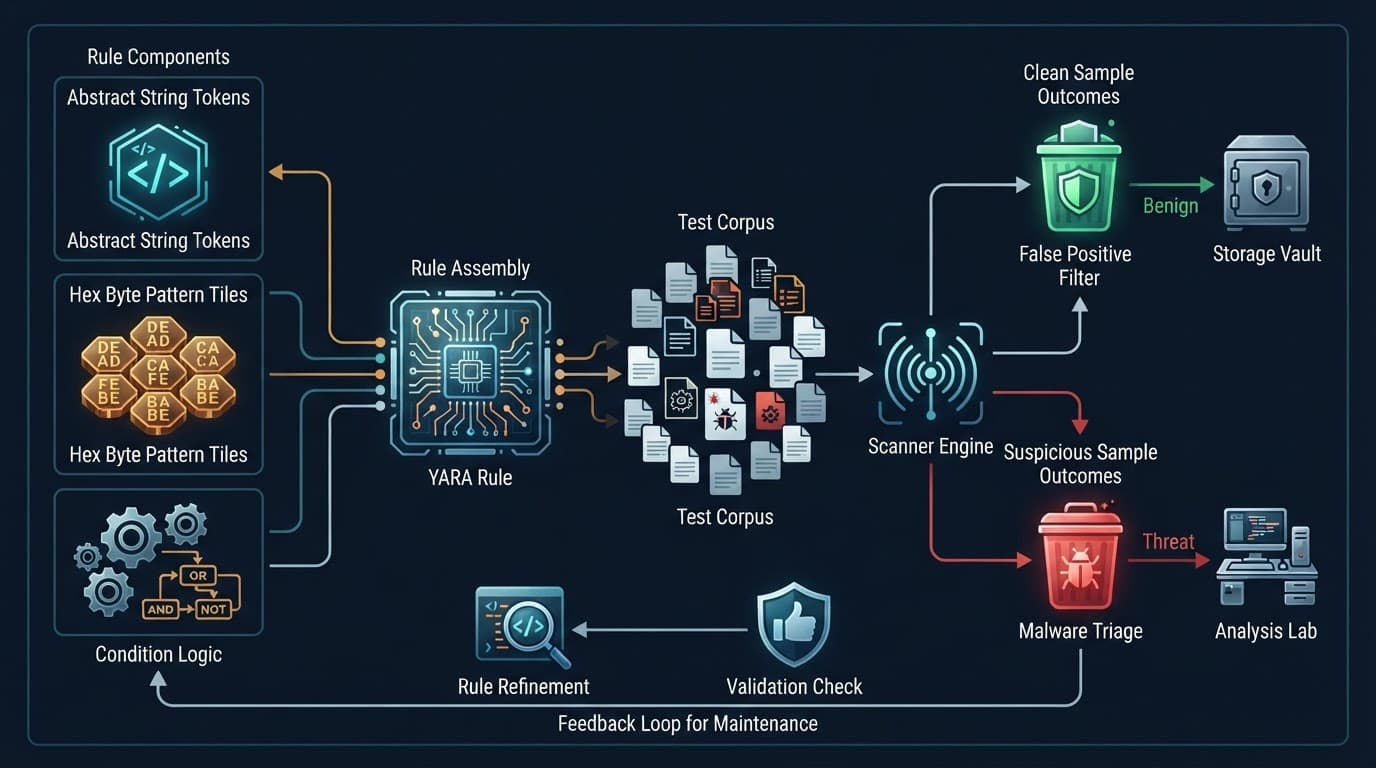
A useful test corpus for Android malware should include more than one suspicious file. Use YARA rules across the malware samples that inspired the rule and related versions from several malware families. Add unrelated suspicious files and broad collections of known-good APKs, extracted DEX files, and ELF files.
This mix supports malware detection by exposing weak assumptions across file types. Where authorized, pair static scans with dynamic analysis as complementary evidence, and record behavioral results separately.
Use a controlled repository with hashes and provenance records. Include apps that share common frameworks, analytics libraries, accessibility functions, or device-management features. Those files are most likely to expose weak conditions.
Also test capa rules across clean and suspicious files, comparing capability labels with analyst classifications.
Measure both misses and false positives
Record every match with the rule name, rule version, artifact hash, scan target, date, and analyst decision. Security teams should require syntax review, peer review, and documented results before production triage.
The YARA hunting reference from ReversingLabs is useful background for understanding file-based matching workflows. Gemini summarization may help organize analyst notes, but never upload sample files or sensitive data.
Tune conditions instead of hiding errors
When a false positive appears, find the shared artifact that caused it. Then add a corroborating string, narrow the file type, or remove the weak indicator. Do not suppress a known-good app by filename alone, because an attacker can reuse that name. During tuning, compare disagreements with capa rules, especially when capability labels conflict with the YARA match.
A missed sample may show that strings changed, code moved into a native library, or the app loads additional code at runtime. Treat misses as evidence for a new review cycle.
Plan for Obfuscation, Packing, and Dynamic Loading
Obfuscation techniques can shorten class names, encrypt configuration, hide strings, or move logic into assets and native libraries. Packed or encrypted code limits what YARA rules can see, while ELF files and JNI-based native bridges may require separate binary analysis. A clean scan never proves an APK is harmless or rules out Android malware.
Dynamic loading creates another blind spot. An app may reference standard Android loading APIs, then obtain code or configuration later through JNI-related dynamic loading. That behavior can be valid for plugins and updates, so review the source, integrity checks, destination files, and actual behavior under authorized conditions.
Use static, dynamic, and hybrid analysis carefully
Static analysis examines files without executing them. Dynamic analysis observes an app while it runs in an isolated environment. Hybrid analysis uses both, with static evidence guiding focused, approved behavioral review and capa rules providing capability context.
YARA rules are strongest in the static phase. They can also triage files collected from a controlled emulator. However, they cannot explain intent or establish whether Android spyware is present.
If encrypted content or obfuscation techniques prevent inspection, preserve the finding and document the limitation. Use capa rules for additional capability context, then escalate through your incident-response process.
Put Matches Into a Real Defensive Workflow
Security teams can use YARA rules to scan quarantined APK inventories, attachment repositories, endpoint collections, and approved backup-restoration workflows. Veeam’s overview of YARA in backup malware detection shows why signature-based checks can support ransomware detection during backup recovery. They can also add context for Android malware detection before restoration.
A match should create a review ticket, not an automatic accusation or deletion. Compare the file hash, signer, code artifacts, install source, device ownership, and authorized behavioral findings. Enrich the review with threat intelligence, and use approved collection workflows for threat hunting.
If your lab uses capa rules for native binaries, capability labels can add useful context alongside YARA matches. Run capa rules again when comparing native capabilities and JNI components. Use Gemini summarization only for sanitized tickets or analyst-authored notes, and never send samples or personal data. A signature-based YARA workflow can miss obfuscated or dynamically loaded code, so matches require broader review.
Match the response to the person affected
- Incident responders should quarantine the artifact, preserve evidence, and coordinate with legal, privacy, and incident-response staff.
- IT administrators should confirm device ownership and management policy before removing an app or inspecting user data.
- Parents should discuss unfamiliar apps openly, review device settings with the owner, and use consent-based safety tools rather than covert counter-monitoring.
Listings that advertise a “spy app for Android and iPhone” should be treated as claims, not proof of what any particular APK does. If outside help is necessary, verify written authorization, scope, reputation, and data-handling terms before engaging a service.
The Rule Is a Starting Point, Not a Final Answer
Dependable YARA rules combine file type, related internal artifacts, and testing against realistic clean software. They also need a defined scope and evidence trail, with security teams assigning an owner and recording review dates as samples change.
For native capability context, capa rules offer an optional corroborating source, not a competing verdict.
The safest result for Android security is a defensible review decision. YARA supports judgment, it does not replace it.
FAQ
Does a YARA match prove that an Android app is spyware?
No. A match only shows that the file contains patterns defined by the rule. Analysts must still validate its provenance, code, permissions, signer, behavior, and legal context.
Should I scan a raw APK or extracted files?
Use both when your workflow supports it, but interpret the results separately. Raw APK archives may compress or encode useful content. Extracted DEX and native ELF files expose clearer file-specific patterns. Document the scan target in the rule metadata.
Can I install a suspicious APK on my personal device to test it?
No. Never install unknown samples on a personal or production device. Perform authorized static review first, then use an approved isolated environment only when your authorization and safety controls allow it.