
I-SPY! The five signs you’re being TRACKED by spying apps watching your location, microphone or camera & how to stop it
How can you know if someone is spying on your phone? Telltale signs include phone overheating or randomly restarting, drained battery, data usage spikes, and more. Let’s take a closer look at 16 signs that indicate spyware on your phone and how to prevent it.
16 signs that someone is spying on your phone
Here are the most common warning signs that your phone is being mirrored, tracked, tapped, or monitored by spyware software:
Increased data usage
You probably have a ballpark figure of your monthly mobile data usage. If someone is spying on your phone, they may be using your cellular network to download any data collected on you (it’s either that or Wi-Fi). Look out for strange spikes, as they’ll likely be a sign of spy apps.
Not tracking your data usage? You should start paying attention right away. While sophisticated versions can be quite discrete, some spyware takes up loads of data.
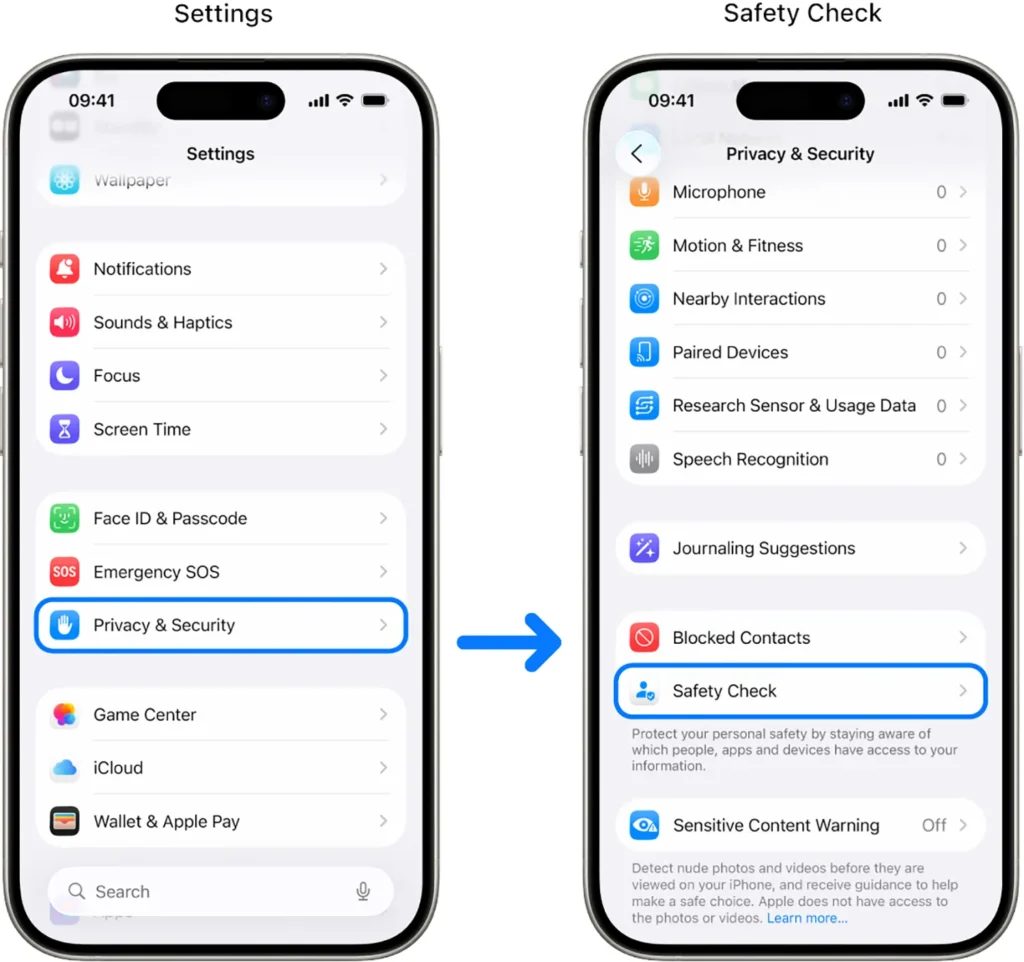
How to check data usage on an iPhone
Here’s how you can check data usage statistics on an iPhone or iPad:
Slower phone performance
While it’s expected for things to get a little sluggish on older phones, slowdowns should always be a cause for concern. Spy apps use more than their fair share of processing power to track your phone, and your speed often takes a hit, even on a newer device.
However, poor speeds brought on by spying are a tough nut to crack. Malicious apps typically won’t instantly bring your device to a standstill — it can take weeks or even months for any noticeable changes to emerge.
Another issue lies in finding the cause of any inferior performance. Did you actually install spyware, or is your phone just getting slower with age? You’ll probably need to do some more digging to get to the bottom of any problems you face.
Try safe mode to figure out why your device is running slow.
Random wake-ups
When you lock your mobile device and set it down, your screen should stay black until you receive a notification. But if it suddenly lights up, despite a total lack of incoming calls or messages, someone may have successfully hacked your smartphone.
A screen lighting up is usually a sign of some processes running in the background. Legitimate apps may bring it to life, but you’ll usually know about this. If your phone starts lighting up without a clear reason on a regular basis, you should start looking into possible spyware apps on your device.
Strange noises during phone calls
Modern mobile phones use advanced noise cancellation and digital connections, so you shouldn’t hear unexplained sounds like echoes, static, or distant voices.
And while classic James Bond-style wiretapping is rare, poor encryption or spyware can still cause interference. If someone is intercepting your calls — especially on apps like Zoom, WhatsApp, or FaceTime — you might notice persistent audio glitches or strange noises that don’t go away, even after restarting the call or switching networks.
If you notice these sounds again and again, your phone’s security could be compromised.
Weird texts
Maybe actually calling someone on your phone isn’t for you. Well, texts can show signs of someone spying on your phone, too.
If you receive strange text messages (yes, even stranger than the typical marketing spam), you may be getting control messages meant for a spy app on your phone. Clues like strange symbols, excessive typos, and weird character combos are dead giveaways.
On top of receiving strange text messages, you may notice SMS messages from your device that you don’t remember sending. Losing track of a text or two happens to the best of us, but if you consistently spot these mysterious messages, they were probably sent by bad actors who have taken over your phone.
Faster battery drainage
Are you scrambling to charge your phone more often than usual? Sure, new apps tend to require more battery power, but what if you haven’t installed anything recently? Spyware apps might be the culprit.
These spy apps need energy to function, just like any other piece of software. And if they’re constantly on, recording your calls or texts, they might be eating up a lot of power.
On the off chance that it’s just the battery getting old, try using it with another device to compare performance. If your smartphone doesn’t have a replaceable battery, take it to any tech support center to check your battery’s health.
Malfunctioning autocorrect
Oh, duck! Autocorrect is hit-or-miss on the best of days. That said, if it starts acting strange or works with a persistent delay, this may be the result of a keylogger at work.
Spyware apps looking to track what you’re typing often go straight to the source — your keyboard or autocorrect itself. If anything about typing suddenly feels off, you may have fallen victim to a hacker.
How to prevent spyware from infecting your phone
Spyware apps certainly sound scary, but there’s plenty you can do to stop them from ever getting on your phone. Here are a few tips on preventing your phone from being riddled with spyware:
- Use antivirus software: a reliable antivirus does more than detect spyware — it actively prevents malware from reaching your phone. Tools like Surfshark Antivirus can scan downloads, app installations, and website activity through Real-time Protection, blocking malicious software before it can harm your device.
Advanced Surfshark Antivirus features like Cloud Protect scan for unknown files in the cloud, while Anti-tamper protection stops bad actors from sabotaging your files or antivirus software. - Use a VPN (Virtual Private Network): VPNs help protect your phone from spyware by hiding your IP (Internet Protocol) address and encrypting your internet traffic. They make it harder for hackers or cybercriminals to track your online activity or steal personal data. Spyware often relies on IP tracking and unsecured connections, but a VPN keeps your browsing private.
Some VPNs offer extra features — like Surfshark VPN’s CleanWeb — that add another layer of defense. CleanWeb blocks trackers, all known ads, and access to malicious sites, preventing you from unknowingly downloading dangerous content and reducing your overall risk of infection. - Keep your phone updated: while they may come across as a minor annoyance, updates to your operating system happen for a reason. The makers of our go-to apps and platforms know their biggest security gaps, and updates tend to offer fixes for most of them. Routinely check for the newest available versions to keep your device in peak shape.
- Don’t use third parties: enabling unsupported apps on Android devices or jailbreaking iPhones (i.e., removing their software restrictions) usually makes your phone more vulnerable to exploitation. Don’t download apps from unknown sources, and stick to trusted providers in your official app store (either the Google Play Store for Android or the Apple App Store for iPhone).
In sum, these steps will significantly improve your phone’s security and protect it from hacking. Remember that spyware is just one form of hacking, so check out our tips on how to know if your phone is hacked for more information.